Few things are more disruptive to an intense gaming session or a focused work sprint than the persistent, irritating squeak of your gaming chair. It’s a sound that breaks immersion, shatters concentration, and can even signal underlying issues with your beloved gear. While the initial joy of a new chair is silent, over time, wear and tear inevitably bring forth those unwelcome noises. But don’t despair; silencing your gaming chair is a remarkably achievable DIY project. This guide will walk you through a safe, systematic process to identify the culprits and apply effective solutions, restoring peace and quiet to your setup without needing to buy a new chair.
Common Culprits: Why Your Gaming Chair Squeaks
Understanding why your gaming chair is making noise is the first step toward a quiet victory. Most squeaks stem from friction between moving parts or loose connections that develop over time with regular use. Identifying the specific source helps you target your repair efforts precisely, ensuring a lasting fix.
The Base and Casters
|
Our Picks for the Best Gaming Chair in 2026
As an Amazon Associate I earn from qualifying purchases.
|
||
| Num | Product | Action |
|---|---|---|
| 1 | BestOffice Gaming Chair Office Chair Ergonomic Desk Chair Racing Style Gaming Chair with Lumbar Support, Swivel Rolling Base, and Comfortable Padded Seat for Women and Men |

|
| 2 | Gaming Chair,Ergonomic Massage Computer Office Desk Chair with Footrest,Pocket Spring Cushion,Reclining Leather Adjustable Gamer Chair with Headrest and Lumbar Support,Black |
|
| 3 | Gaming Chair,Ergonomic Massage Computer Office Desk Chair with Footrest,Pocket Spring Cushion,Reclining Leather Adjustable Gamer Chair with Headrest and Lumbar Support,Purple |
|
| 4 | BestOffice High-Back Gaming Chair PC Office Chair Computer Racing Chair PU Desk Task Chair Ergonomic Executive Swivel Rolling Chair with Lumbar Support for Back Pain Women, Men,White |
|
| 5 | White Gaming Chair,Ergonomic Massage Computer Office Desk Chair with Footrest,Pocket Spring Cushion,Reclining Leather Adjustable Gamer Chair with Headrest and Lumbar Support,White |
|
| 6 | Gaming Chair Office Chair Desk Chair Ergonomic Executive Swivel Rolling Computer Chair with Lumbar Support, Pink |
|
| 7 | BestOffice High-Back Gaming Chair PC Office Chair Computer Racing Chair PU Desk Task Chair Ergonomic Executive Swivel Rolling Chair with Lumbar Support for Back Pain Women, Men,Blue |
|
| 8 | Gaming Chair, 400 lbs Adult Chair, High Back Computer Chair with Footrest and Linked Armrests, Office Video Game Chair with Lumbar Support (Grey) |
|
| 9 | Office Chair Gaming Chair Desk Chair Ergonomic Executive Swivel Rolling Computer Chair with Lumbar Support |
|
| 10 | BestOffice PC Gaming Chair Ergonomic Office Chair Cheap Desk Chair Executive Task Computer Chair Back Support Modern Executive Adjustable Arms Rolling Swivel Chair for Women, Men |
|
The foundation of your gaming chair, including its five-star base and rolling casters, is a frequent source of noise. Over time, dust, pet hair, and debris can accumulate around caster axles, creating friction and grinding sounds. Additionally, the stems of the casters where they insert into the base can dry out or become loose, leading to creaks when you roll or shift your weight. These areas are constantly under pressure and movement, making them prime candidates for squeaks.
Gas Lift Mechanism
While often overlooked, the gas lift cylinder can also contribute to unwanted noises. Although the internal mechanism rarely squeaks itself, the points where the gas lift connects to the seat plate and the chair’s base can become dry or develop slight play. This can result in subtle groans or creaks, especially when you adjust the chair’s height or rotate it. It’s crucial to address these external connection points rather than attempting to dismantle the sealed gas cylinder.
Backrest and Seat Connection
The dynamic interplay between your chair’s backrest and seat is a common area for friction. The recline mechanism, hinge points, and where the backrest attaches to the seat plate often involve metal-on-metal contact. As factory lubrication wears off, these pivot points can rub together, causing significant squeaking or creaking as you lean back, sit up, or shift in your seat. The tilt tension spring inside the mechanism is particularly notorious for producing noise when dry.
Armrests
Adjustable armrests, with their various pivot and height adjustment points, are another frequent source of irritating sounds. Internal components can become loose, or the plastic and metal parts can rub against each other without adequate lubrication. This results in squeaks or clicks every time you adjust their position or even rest your weight on them during gameplay.
Loose or Worn Bolts
Perhaps the most common and easily fixable cause of a squeaky gaming chair is loose bolts and screws. Over months of use, the vibrations and movements of sitting can gradually loosen fasteners that hold the chair’s components together. This creates tiny gaps where metal can grind against metal or plastic, producing a chorus of creaks and groans. A thorough tightening can often resolve a majority of squeaking issues.
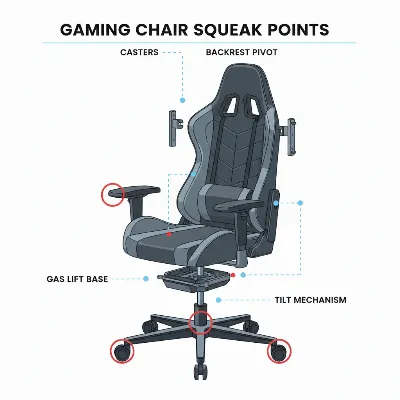 Common parts of a gaming chair that squeak, including casters, gas lift, and backrest mechanism.
Essential Tools and Materials for the Job
Before you embark on your chair-silencing mission, gathering the right tools and lubricants will make the process smoother and more effective. A few common household items and specific lubricants are all you’ll typically need.
Basic Toolkit
For most gaming chair repairs, you won’t need specialized equipment. A basic set of tools is usually sufficient:
- Allen Wrenches (Hex Keys): Most gaming chairs come with an Allen key for assembly. If you’ve misplaced it, a standard set of hex keys will work.
- Screwdrivers: Both Phillips and flathead screwdrivers might be necessary for different fasteners.
- Wrenches: An adjustable wrench or a set of standard wrenches can be useful for stubborn nuts or bolts.
- Microfiber Cloths: Essential for cleaning surfaces before lubrication and wiping away excess product.
- Compressed Air: Great for blowing dust and debris out of tight crevices.
Lubricants of Choice
Choosing the right lubricant is critical for a lasting fix. While some products offer temporary relief, others provide superior long-term performance for specific materials.
- Silicone Spray: This is an excellent choice for lubricating plastic-on-plastic parts and telescoping columns, such as those found in armrest mechanisms or the lower part of the gas lift. Silicone spray doesn’t attract dust, making it ideal for components exposed to the environment.
- White Lithium Grease (Spray Can): Highly recommended for metal-on-metal contacts, heavy-duty pivot points, and springs, like those in the tilt mechanism. Lithium grease provides a durable, long-lasting film that resists water and corrosion, making it perfect for areas under significant pressure and movement.
- WD-40: While popular, it’s important to understand WD-40’s role. It’s primarily a water displacer and solvent, excellent for loosening rusted bolts or cleaning gunk. However, it is not a long-term lubricant and can evaporate quickly or attract dust, potentially worsening the problem over time. Use it to clean or loosen parts, but always follow up with a proper lubricant like silicone spray or lithium grease for lasting silence.
Cleaning Supplies
Beyond simply lubricating, a good cleaning is paramount. Isopropyl alcohol can be used with microfiber cloths to remove old, gummy grease and grime, ensuring the new lubricant adheres properly and works effectively. Remember, applying lubricant on top of dirt creates an abrasive paste, accelerating wear rather than preventing it.
Step-by-Step DIY Guide to Silencing Your Gaming Chair
With your tools and lubricants ready, it’s time to systematically tackle those annoying squeaks. Follow these steps for a thorough and effective repair.
Step 1: Locate the Squeak
Before reaching for any tools, pinpoint the exact source of the noise. This crucial diagnostic step will save you time and effort.
- Sit and Move: Sit in your chair and slowly move through its full range of motion. Lean back, rock side-to-side, twist, adjust the height, and move the armrests. Listen carefully to identify where the sound is coming from.
- Isolate Sections: If the sound is elusive, try to isolate sections. For example, remove the casters and roll the chair on its base (carefully!) to see if the noise stops.
- Ask for Help: A second person can help by listening from different angles while you move the chair.
Step 2: Tighten All Bolts and Screws
Loose fasteners are the most common cause of squeaking. A systematic tightening can often resolve many issues instantly.
- Flip the Chair: Carefully turn your chair upside down or on its side to access all bolts and screws.
- Inspect and Tighten: Using your Allen keys and screwdrivers, go through every visible bolt, nut, and screw. Pay particular attention to:
- Where the seat connects to the backrest.
- The connection points between the seat plate and the tilt mechanism.
- Armrest attachment points.
- The bolts securing the base to the chair’s main column.
- Do Not Overtighten: Tighten until snug, but avoid excessive force, which can strip threads or damage components.
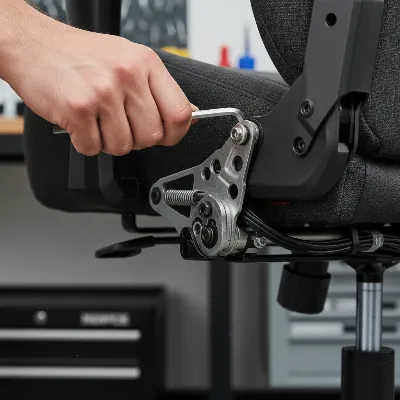 A person using an Allen wrench to tighten bolts on the underside of a gaming chair's seat mechanism.
Step 3: Lubricate Moving Parts
Once everything is tightened, it’s time to lubricate the friction points.
- Casters:
- Pull each caster out of the chair’s base.
- Clean any accumulated hair, dust, or debris from the caster stem and wheel axle using compressed air or a cloth.
- Apply a small amount of silicone spray or white lithium grease to the caster stem before reinserting it.
- Gas Lift Mechanism:
- Raise the chair to its highest setting.
- Apply a small amount of silicone spray where the bottom of the cylinder fits into the central hub of the five-star base.
- Apply white lithium grease to the contact point where the top of the cylinder meets the tilt mechanism underneath the seat. Never attempt to open the gas cylinder itself.
- Tilt/Recline Mechanism: This is often the primary source of squeaks.
- With the chair tilted on its side, identify all moving joints, pins, and springs within the metal housing under the seat.
- Clean the mechanism thoroughly with compressed air and wipe away old lubricant with isopropyl alcohol.
- Apply white lithium grease generously to all pivot points, springs, and where large metal parts move against each other.
- Work the tilt mechanism back and forth several times to distribute the lubricant evenly.
- Backrest:
- If the backrest squeaks when you lean back, lubricate the pivot points where it connects to the seat.
- If your chair has a seat tension knob, remove it and apply a small amount of white lithium grease to the tension spring inside its housing.
- Armrests:
- Lubricate any visible pivot points or adjustment mechanisms on the armrests with silicone spray.
- If the armrests are bolted directly to the seat, remove the bolts, apply a thin layer of white lithium grease to the bolt threads and contact surfaces, and reassemble.
Step 4: Inspect and Clean Casters
Even after lubricating, casters can still be noisy if they’re obstructed.
- Remove Debris: Carefully pull out each wheel and remove any tangled hair, carpet fibers, or dirt wrapped around the axle. This debris can cause resistance and grinding noises.
- Wipe Clean: Use a cloth to wipe the wheels clean before reinserting them.
Step 5: Test and Re-test
Once you’ve applied all the fixes, it’s time for the final check.
- Move and Listen: Sit in the chair and repeat the movements from Step 1. Lean back, rock, twist, and adjust the height and armrests.
- Pinpoint Remaining Squeaks: If any squeaks persist, try to pinpoint their exact location again and reapply lubricant or re-tighten bolts specifically in that area. Sometimes a second pass is necessary to catch everything.
Advanced Troubleshooting and Prevention Tips
Sometimes, a basic DIY fix isn’t enough, or you might want to prevent future squeaks. Here are some advanced tips for those persistent noises and for long-term chair health.
When to Replace Parts
If a squeak remains despite all lubrication and tightening efforts, or if a component appears visibly damaged, replacement might be the only option.
- Severely Worn Casters: If wheels are cracked, wobbling excessively, or don’t roll smoothly even after cleaning and lubrication, consider replacing them.
- Damaged Gas Lift: While external squeaks can be fixed, a gas lift that consistently sinks or feels unstable might be failing internally. Replacing the gas lift cylinder (a relatively straightforward process) can restore height adjustment and stability.
- Internal Mechanism Damage: For more complex internal squeaks that cannot be reached or identified, the entire tilt mechanism might be damaged. In such cases, contacting the manufacturer for replacement parts or professional repair might be necessary.
Regular Maintenance for Longevity
Prevention is always better than cure. Incorporating regular maintenance into your routine can significantly extend the life of your gaming chair and keep it silent.
- Routine Tightening: Every 3-6 months, take a few minutes to quickly check and tighten all accessible bolts and screws. This prevents them from loosening enough to cause squeaks.
- Periodic Lubrication: Depending on usage, consider a light re-lubrication of key pivot points, especially the tilt mechanism and casters, every 6-12 months.
- Keep it Clean: Regularly vacuum or wipe down your chair, especially around the base and casters, to prevent dust and debris buildup.
- Gentle Use: Treat your chair with care. Avoid excessive force when sitting down, leaning back, or adjusting components.
“A gaming chair is an extension of your setup, and like any high-performance gear, it benefits immensely from consistent care. Addressing minor issues promptly prevents them from escalating into major distractions.” – Alex ‘Apex’ Chen, Esports Equipment Analyst
Conclusion
A squeaky gaming chair can be a frustrating obstacle to a truly immersive gaming experience or a productive work environment. Fortunately, with a methodical approach, the right tools, and a bit of lubricant, most annoying noises can be effectively silenced. By understanding the common sources of squeaks, systematically tightening connections, and applying appropriate lubricants to all moving parts, you can restore your chair to its former quiet glory. Regular maintenance will further ensure your gaming throne remains a source of comfort and focus, rather than distraction. So, take charge, give your gaming chair the attention it deserves, and reclaim your silent sanctuary. What’s your go-to trick for keeping your gaming chair squeak-free?
Frequently Asked Questions
What causes a gaming chair to squeak?
Gaming chairs typically squeak due to friction between moving parts, such as metal-on-metal or plastic-on-plastic contact, often caused by inadequate lubrication or loose bolts and screws. Dust and debris can also contribute by creating abrasive surfaces.
Is WD-40 safe to use on a gaming chair?
WD-40 can be used as a temporary solvent to loosen parts or clean gunk, but it is not a long-term lubricant. It can attract dust and dry out plastic components over time. For lasting results, use silicone spray for plastic parts and white lithium grease for metal-on-metal connections.
How often should I lubricate my gaming chair?
For optimal performance and to prevent squeaks, it’s advisable to perform a light re-lubrication of key pivot points, especially the tilt mechanism and casters, every 6-12 months, depending on how frequently you use your chair.
Can a new gaming chair also squeak?
Yes, even new gaming chairs can sometimes squeak. This can happen if bolts were not sufficiently tightened during assembly, or if certain components require lubrication right out of the box due to manufacturing tolerances or shipping conditions.
When is it time to replace a squeaky chair?
You should consider replacing your gaming chair if the squeaking persists despite thorough tightening and lubrication, if the gas lift is consistently failing, or if structural components are visibly damaged, cracked, or severely worn, indicating a potential safety risk.
How do I prevent my gaming chair from squeaking in the future?
Prevent future squeaks by regularly tightening all bolts and screws (every 3-6 months), performing periodic lubrication of moving parts, keeping the chair clean from dust and debris, and treating it gently to minimize stress on its components.
What are the best lubricants for gaming chairs?
The best lubricants for Gaming Chairs are silicone spray for plastic and rubber components, and white lithium grease (in a spray can) for metal-on-metal parts, heavy-duty pivot points, and springs. These provide long-lasting, effective lubrication.