Investing in an ergonomic gaming chair is a fundamental step towards preserving spinal health and enhancing gaming longevity, especially for those experiencing lower back pain. The best ergonomic gaming chairs feature integrated, adjustable lumbar support, superior adjustability for seat height and depth, and high-density cushioning to promote proper posture and reduce pressure during extended sessions. Models like the Secretlab TITAN Evo and Razer Iskur V2 offer advanced systems designed to alleviate discomfort and keep gamers focused.
Understanding Ergonomic Gaming Chairs: Types and Core Principles
Ergonomic gaming chairs are specifically designed to support the natural curvature of your spine, promote proper posture, and reduce pressure points during extended sitting. While traditional racing-style chairs often prioritize aesthetics, true ergonomic models integrate advanced design principles to cradle your body effectively.
Ergonomic-Focused Gaming Chairs
These chairs, often inspired by high-end office ergonomics, prioritize health and adaptability above all else. They might feature sophisticated mechanisms, breathable mesh, and a less aggressive aesthetic, focusing on dynamic support that moves with your body. Brands like Herman Miller and Hinomi typically fall into this category, offering highly customizable solutions that blend seamlessly into both gaming and professional environments. Their designs are rooted in biomechanical research, aiming to alleviate pressure and encourage micro-movements essential for spinal disc health.
Racing-Style Ergonomic Gaming Chairs
Many popular gaming chair brands have successfully blended the iconic racing bucket seat aesthetic with robust ergonomic features. These chairs typically boast high backrests, prominent side bolsters, and often come with external or integrated lumbar and neck pillows. While visually striking, the key is their underlying adjustability. Leading examples include the Secretlab TITAN Evo series and Razer Iskur models, which have evolved to offer sophisticated built-in lumbar support systems that provide superior adjustability compared to basic pillows.
Hybrid and Mesh Gaming Chairs
Combining the best of both worlds, hybrid and mesh chairs often feature mesh backs for enhanced breathability, which is excellent for prolonged sessions, especially in warmer climates. They can incorporate ergonomic seat designs, adjustable lumbar support, and often offer a lighter, more flexible feel than their heavily padded counterparts. The Nouhaus Ergo3D is a good representation, offering a blend of support and airflow, appealing to those who prioritize cooling and flexible comfort.
Essential Factors When Choosing a Gaming Chair for Lower Back Pain
Selecting the right ergonomic gaming chair is critical for lower back pain relief. It requires careful consideration of several key features that contribute to spinal health and overall comfort.
Advanced Lumbar Support Systems
|
Our Picks for the Best Gaming Chair in 2026
As an Amazon Associate I earn from qualifying purchases.
|
||
| Num | Product | Action |
|---|---|---|
| 1 | BestOffice High-Back Gaming Chair PC Office Chair Computer Racing Chair PU Desk Task Chair Ergonomic Executive Swivel Rolling Chair with Lumbar Support for Back Pain Women, Men,Blue |

|
| 2 | Fabric Gaming Chair, Skin-Friendly and Breathable, Manufactured by A Reputable Manufacturer, Safe and Stable, Specially Designed for Gaming.with Footrest Mg(1005-LightBlue) |
|
| 3 | Gaming Chair with Footrest, Ergonomic Fabric Computer Chair with Lumbar Support, High Back Reclining Office Chair with Adjustable Height & Angle, 300KG Capacity (Grey Linen) |
|
| 4 | Gaming Chair with Footrest for Adults - Ergonomic Gaming Chairs with Foot Rest - Big and Tall Computer Game Chair - Fabric Reclining Video Game Chairs with Spring Cushion - Blue/Light Grey |
|
| 5 | Gaming Chair Office Chair Desk Chair Ergonomic Executive Swivel Rolling Computer Chair with Lumbar Support, Pink |
|
| 6 | BestOffice High-Back Gaming Chair PC Office Chair Computer Racing Chair PU Desk Task Chair Ergonomic Executive Swivel Rolling Chair with Lumbar Support for Back Pain Women, Men,White |
|
| 7 | Gaming Chair with Footrest for Adults - Ergonomic Gaming Chairs with Foot Rest - Big and Tall Computer Game Chair - PU Leather Reclining Video Game Chairs with Spring Cushion - Black/Light Blue |
|
| 8 | White Gaming Chair,Ergonomic Massage Computer Office Desk Chair with Footrest,Pocket Spring Cushion,Reclining Leather Adjustable Gamer Chair with Headrest and Lumbar Support,White |
|
| 9 | Gaming Chair, High Back Fabric Computer Chair with Pocketed Spring Cushion and Footrest, Height Adjustable Game Chair with Headrest and Lumbar Support (Beige & Green) |
|
| 10 | Ergonomic Gaming Chair, Video Game Chair with Pocket Spring Cushion and Footrest, Height Adjustable Computer Chair with Swivel Seat and Headrest (Purple) |
|
The cornerstone of any good ergonomic gaming chair is its lumbar support. Generic pillows can often push your spine into an unnatural position. Look for chairs with integrated, adjustable lumbar support that can be customized in both height and depth. This allows you to precisely align the support with the natural curve of your lower back, from the L1 to L5 vertebrae, ensuring a neutral spine posture. Chairs like the Secretlab TITAN Evo with its L-ADAPT™ Lumbar Support System and the Razer Iskur V2 with its integrated lumbar arch are prime examples of systems designed for precise, dynamic support.
Superior Adjustability
A truly ergonomic chair adapts to your body, not the other way around. Extensive adjustability is paramount.
- Seat Height: Ensure your feet can rest flat on the floor with your knees bent at a 90-degree angle. This maintains healthy circulation and reduces pressure on your lower back.
- Seat Depth: The seat should allow a small gap (about two fingers) between the back of your knees and the seat edge, preventing pressure on your thighs and promoting circulation.
- Recline and Tilt Mechanism: The ability to recline allows you to shift weight and change posture, alleviating continuous strain on your spine. A range from 90° (upright) to 135-155° (relaxed) is ideal, allowing for various activities from focused gaming to resting.
- Armrests: Seek 3D or 4D adjustable armrests (up/down, forward/backward, side-to-side, pivot). Proper arm support reduces strain on your shoulders and wrists, which indirectly minimizes tension in your upper back that can transfer to the lower back.
- Headrest/Neck Support: An adjustable headrest or dedicated neck pillow is crucial for supporting the cervical spine, preventing neck strain and upper back tension.
High-Quality Materials and Cushioning
The materials and cushioning directly impact comfort, durability, and temperature regulation.
- Foam Density: High-density, cold-cure foam or memory foam is preferred for the seat and backrest. These materials distribute weight evenly, maintain their shape over time, and prevent you from sinking too deeply, which can misalign your spine.
- Breathability: For long sessions, especially in warmer environments, breathable materials like mesh or certain fabric weaves are excellent for dissipating heat and preventing sweat build-up. Quality PU leather can also be durable and easy to clean, but ensure it’s high-grade to prevent cracking.
- Waterfall Seat Edge: A seat designed with a gentle “waterfall” edge at the front helps reduce pressure on your thighs, improving blood circulation and overall comfort.
Proper Fit for Body Size
One size does not fit all when it comes to ergonomic chairs. A chair that is too small can feel restrictive, while one too large may not provide adequate support. Always check the manufacturer’s recommendations for height and weight. Key measurements include:
- Seat Width: Ensure ample space without feeling cramped.
- Backrest Height: The backrest should adequately support your entire spine, including your upper back and shoulders.
Sturdy Build Quality
A gaming chair is an investment in your health. Look for chairs constructed with a robust steel frame, high-quality casters (wheels) that glide smoothly, and durable tilt mechanisms. These components ensure stability, longevity, and reliable performance over years of use.
Top Brands and Models for Back Pain Relief
Many brands are now prioritizing ergonomic design alongside gaming aesthetics. Here are a few notable options known for their back support features:
- Secretlab TITAN Evo Series: Often touted as an industry leader, the TITAN Evo features the L-ADAPT™ Lumbar Support System, a proprietary lattice of living hinges built directly into the backrest, offering four-way adjustment (height and depth). Available in various sizes (Small, Regular, XL), it caters to a wide range of body types.
“The TITAN Evo’s L-ADAPT™ system is a major upgrade for personalized lumbar support, moving beyond static pillows to truly adapt to your spinal curvature.” — Dr. Emily R. Chen, Ergonomics Specialist
- Razer Iskur V2 Series: Razer’s ergonomic offering is distinguished by its integrated lumbar arch, which is directly built into the backrest. The V2 series often boasts “6D” lumbar support, allowing for precise positioning to enhance comfort and maintain natural spinal alignment without the need for external cushions.
- Herman Miller x Logitech G Embody: A premium choice, the Embody chair uses Pixelated Support™ technology where a matrix of pixels dynamically conforms to your body’s micro-movements. Its “Backfit” adjustment allows users to position the backrest to match their spine’s natural curve, reducing pressure build-up. This chair moves with you, rather than forcing a position.
- AndaSeat Kaiser Series: The Kaiser chairs are known for their sturdy build and often include a pop-out lumbar support system with four-way adjustment. They tend to feature wider seats, catering well to users who prefer more space or have a larger build, providing excellent support for the lower back and hips.
- Dowinx Gaming Chairs: Dowinx offers several models, some featuring a massage lumbar pillow to actively stimulate circulation and relieve tension, a unique feature for gamers seeking additional comfort and relief during long sessions. Their chairs often include deep recline and an extendable footrest.
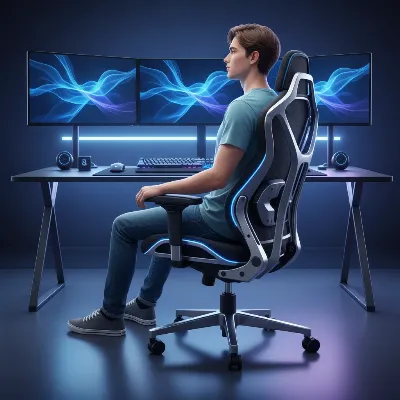 An ergonomic gaming chair with adjustable lumbar support and a person sitting correctly, illustrating good posture and back alignment.
Buying Guide: Finding Your Perfect Ergonomic Gaming Chair
Finding the “best” chair is ultimately about finding the best chair for you. Follow these steps to make an informed decision:
1. Assess Your Needs and Budget
Start by evaluating your specific requirements. How many hours a day do you spend sitting? Do you have existing back pain, and if so, where (lower, mid, upper)? What is your budget range? High-end ergonomic chairs can be a significant investment, but there are excellent mid-range options available. Consider how crucial each feature is to your comfort and health.
2. Prioritize Adjustability and Support
While aesthetics can be appealing, never compromise on adjustability and support. A chair with more customizable features will allow you to fine-tune it to your unique body dimensions and preferred sitting postures, which is key for long-term back health. Focus on chairs with robust, integrated lumbar support systems over generic pillows.
3. Check Size and Weight Specifications
This cannot be stressed enough: a chair must fit your body. Measure your height and weight accurately, then compare these to the chair manufacturer’s recommended specifications. Pay attention to seat width, depth, and backrest height to ensure a comfortable and supportive fit. A chair that is too small or too large will negate even the most advanced ergonomic features.
4. Read Reviews and Testimonials
Look for reviews from other users, especially those who mention similar body types or specific back pain issues. Pay attention to feedback regarding the longevity of materials, the effectiveness of the adjustment mechanisms, and overall comfort after extended use. Video reviews can also provide valuable insights into a chair’s real-world functionality.
5. Consider Material for Climate and Comfort
Think about your local climate and personal preferences. If you tend to get warm, a chair with breathable mesh or fabric upholstery might be a better choice. If durability and easy cleaning are priorities, a high-quality PU leather could be suitable. Some chairs offer cooling gel inserts or perforated designs for added temperature regulation.
6. Warranty and Customer Service
An ergonomic gaming chair is a substantial investment. Check the warranty policy for the frame, moving parts, and upholstery. Good customer service can also be invaluable if you encounter any issues or need support with adjustments.
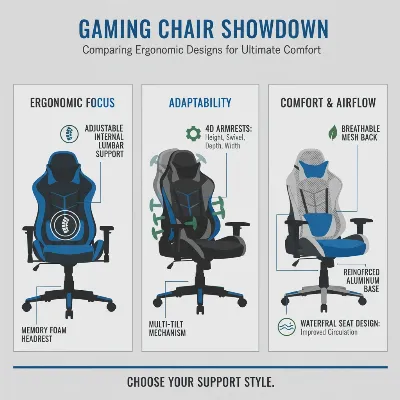 A detailed infographic comparing key ergonomic features of different gaming chairs like lumbar support, armrests, and materials.
Conclusion
Choosing the best ergonomic gaming chair for lower back pain relief is a pivotal decision that impacts both your comfort and your long-term health. By understanding the critical role of features like adjustable lumbar support, comprehensive adjustability, and quality materials, you can confidently navigate the many options available. Investing in a chair that truly supports your spine means more comfortable, pain-free gaming sessions, allowing you to focus on dominating your virtual worlds rather than managing physical discomfort. Prioritize your well-being today, and let your gaming chair be a foundation for health and peak performance. What feature are you most excited to customize for your ultimate comfort?
Frequently Asked Questions
How to Choose an Ergonomic Gaming Chair for Back Pain
Follow these steps to select the best ergonomic gaming chair that provides optimal support and comfort for lower back pain relief during long gaming sessions.
Evaluate how many hours you spend sitting daily and if you have existing back pain. Determine your budget range, considering that high-end ergonomic chairs are a significant investment but offer superior features. Prioritize features crucial for your comfort and health.
Never compromise on a chair's adjustability and support features. A chair with more customizable options allows you to fine-tune it to your unique body dimensions and preferred sitting postures, which is essential for long-term back health. Focus on chairs with robust, integrated lumbar support systems over generic pillows.
Ensure the chair fits your body by accurately measuring your height and weight, then comparing these to the manufacturer's recommended specifications. Pay close attention to seat width, depth, and backrest height to guarantee a comfortable and supportive fit. An ill-fitting chair will negate even the most advanced ergonomic features.
Seek out reviews from other users, especially those with similar body types or specific back pain issues. Pay attention to feedback regarding material longevity, adjustment mechanism effectiveness, and overall comfort after extended use. Video reviews can also offer valuable insights into real-world functionality.
Think about your local climate and personal preferences. If you tend to get warm, a chair with breathable mesh or fabric upholstery might be a better choice. For durability and easy cleaning, high-quality PU leather could be suitable, with some chairs offering cooling gel inserts for added temperature regulation.
Get our weekly buyer guide
Practical specs, not advice. Unsubscribe anytime.

This chair has completely transformed my gaming setup. I used to slouch so much, and my posture was terrible, leading to constant discomfort. The focus on proper posture and spinal health really resonated with me, and I can honestly say I feel much better after switching to an ergonomic model. No more nagging back pain!
I finally pulled the trigger on a Secretlab TITAN Evo after reading about it here, and wow, what a difference! My lower back pain used to be a real issue after long gaming sessions, but the adjustable lumbar support on this chair is a game-changer. It’s incredibly comfortable and feels super sturdy. Definitely worth the investment for anyone serious about their gaming and their back health.
I’ve been using a Razer Iskur V2 for a few months now, and it’s mostly fantastic. The high-density cushioning is really supportive, and I’ve noticed a significant reduction in the usual aches I’d get. My only minor complaint is that the armrests can be a little stiff to adjust sometimes, but once they’re set, they’re solid. Overall, a great chair for extended sessions.
I was hoping for a bit more from the ergonomic features mentioned. While the seat height and depth adjustability is good, I found the integrated lumbar support on my new chair (not one of the premium brands, but in the mid-range price point) to be just okay. It helps a little, but I still feel some pressure after a few hours. Maybe I just need to spend more time fine-tuning it.